

Overview
At the bare minimum, you need references you can open without internet. A preconfigured server is one way to get there, not something every household needs to buy.
Codex Standard is hardware sold by Personal Codex with Project N.O.M.A.D. installed and a library preloaded. Personal Codex says it is independent of Crosstalk Solutions, the team behind N.O.M.A.D. The software itself is free; you're paying for the computer and setup work.
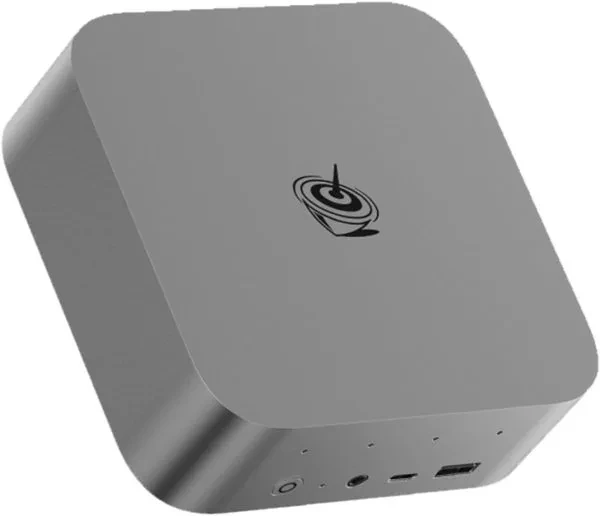
The listing describes a compact mini PC with at least 32 GB memory and 1 TB storage. It lists a Minisforum UM880 Plus or equivalent and allows processor alternatives. I'd ask for the exact configuration rather than assume the pictured unit is the one that will arrive.
This isn't a hands-on review. The seller's speed and benchmark figures are claims or estimates, and built-to-order timing can change. For a Canadian order, confirm currency, shipping, taxes, returns and warranty coverage first.
What you'll need
- The delivered computer, its matched power supply and the seller's setup instructions
- A private router and another device with a browser
- Internet access for initial checks, updates and any missing downloads
- A separate drive for backups
- A power plan for the server, router and viewing device
Tool considerations
Codex Standard
- Good fit
- A household that wants a preconfigured knowledge server and is comfortable maintaining it afterwards.
- What stands out
- The seller lists at least 32 GB memory and 1 TB storage, with Wikipedia, maps, medical references, education content and local AI. It saves the initial installation work.
- The trade-off
- It's hardware running the same free N.O.M.A.D. software, not a separate AI platform. The listing allows equivalent hardware and gives estimates, not independently tested performance.
- Before going offline
- Check the included archives, regions and model files, then restart and test with the internet disconnected. You'll still need power for the computer, router and viewing device.
Built to order by an independent supplier, not Crosstalk Solutions. Confirm the exact hardware, currency, Canadian shipping, taxes, warranty and delivery estimate before paying.
Buy Codex StandardInstructions
Confirm the order before buying
Ask the seller to confirm the processor, graphics, memory, storage, included model files and archive dates. Check which map regions are included. The listing gives different build-time estimates, so ask for a written estimate along with Canadian shipping and warranty terms.
Follow the supplied first-start instructions
Check the delivered equipment against your order and use the supplied power adapter. Follow the seller's instructions for connecting the machine and opening N.O.M.A.D. If instructions or access details are missing, ask the seller rather than guess a password or reinstall over the supplied library.
Keep it on your private network
Record the server's local address from the supplied instructions. N.O.M.A.D.'s documented setup has no built-in authentication. Don't expose it to the public internet, enable port forwarding or share it on guest Wi-Fi. Keep identity and medical records outside this shared library.
Check the preloaded references
Open a few Wikipedia articles, education materials and practical references. Check publication dates, search for a known topic and compare important advice with current Canadian sources. A seller's full-library description doesn't tell you whether every collection your household needs is present.
Prepare the places and models you need
While online, add missing map regions and check that your chosen AI model is downloaded and runs locally. Use a simple known-answer prompt. Confirm any document search also uses local services. Server maps are for viewing and searching; keep a separate offline navigation app on your phone.
Run a disconnected restart test
Coordinate the test with your household. Disconnect the router's internet cable while leaving local Wi-Fi powered, and disable cellular data on the viewing device. Restart the server, open its saved local address and try a fresh reference search, a map and a new AI question. Check the AI answer against the original source.
Back up and write down the working setup
Follow the current N.O.M.A.D. backup instructions and the seller's advice for the installed system. Keep important references separately and test opening a backup file. Record the local address, versions and missing items on paper. Measure backup runtime with the computer and router both connected.
Check it works offline
- The exact delivered hardware matches the confirmed order.
- The library opens after a restart with internet and cellular data off.
- Relevant map regions and a fresh local AI question work offline.
- Important references remain readable without the AI and have a tested separate backup.
Things to watch for
I haven't used this machine. Product specifications and performance claims come from the seller, not our own tests.
Preconfigured doesn't mean maintenance-free. Downloaded references age, hardware can fail and updates can change behaviour.
Local AI can still give wrong answers. Use current Canadian guidance and proper training for health, food safety, heating and electrical work.
Don't treat this as backup power or satellite internet. The server and local network still need electricity.
Useful equipment
Portable SSD
For a second copy of archives and documents. Capacity depends on the files you choose; encryption is a separate requirement.
See on Amazon.caUPS for computer and router
Check the delivered equipment's power needs and measure actual runtime with both devices connected.
See on Amazon.caAmazon.ca search links; no hands-on endorsement or guaranteed compatibility. As an Amazon Associate I earn from qualifying purchases.
Sources and further reading
Related how-tos
Build an offline knowledge server with N.O.M.A.D.
Put references, learning materials, regional maps and optional AI on one household server — without confusing a local network with the internet.
Read the how-toPrepare offline maps and alternate routes
Download connecting regions in Organic Maps or OsmAnd, save destinations and test search, routing and location without mobile data.
Read the how-toRun an offline knowledge and maps drill
Restart devices, cut internet access and test fresh work — not just a cached page or an old chat — before depending on the kit.
Read the how-to